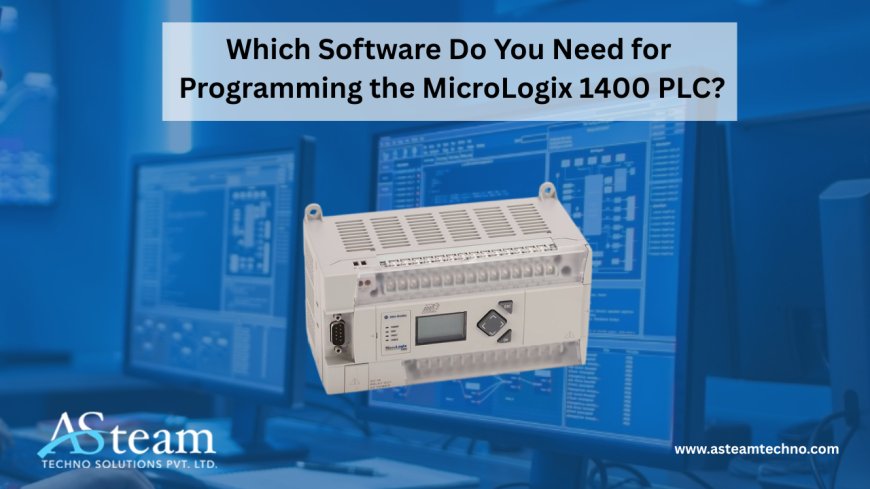
Which Software Do You Need for Programming the MicroLogix 1400 PLC?
Learn which software is required to program the Allen-Bradley MicroLogix 1400 PLC. Discover the right tools, features, and setup options to simplify programming and improve automation performance.
Introduction
The Allen-Bradley MicroLogix 1400 is one of the most popular PLCs used across industries, thanks to its flexibility, built-in communication options, and reliability in controlling automation processes. Whether it’s managing production lines, monitoring utilities, or supporting custom machinery, this PLC has earned its place in modern facilities. However, having the hardware alone is not enough—choosing the right programming software is equally critical. The software not only determines how efficiently you can configure and troubleshoot the PLC but also impacts system performance and uptime. This raises an important question for engineers and technicians: Which software do you need to program the MicroLogix 1400, and why does it matter so much?
Detailed Answer
The MicroLogix 1400 is programmed using RSLogix 500 software, which has been specifically designed for Allen-Bradley’s SLC 500 and MicroLogix families. To take full advantage of the controller’s features, you’ll need version 8.1 or higher, as earlier versions may not support enhancements such as Ethernet connectivity and expanded I/O handling. RSLogix 500 is the ideal fit because it aligns perfectly with the architecture of the MicroLogix series, ensuring smooth integration and dependable operation. Beyond just creating ladder logic, the software also enables configuration of the built-in real-time clock (RTC) and data monitoring tools, both of which are essential for accurate time-stamping and system control. In short, RSLogix 500 isn’t just compatible—it’s the software that unlocks the MicroLogix 1400’s full potential.
Key Features of RSLogix 500 for MicroLogix 1400
RSLogix 500 offers a range of features that make programming and maintaining the MicroLogix 1400 both efficient and user-friendly. At its core, it provides ladder logic programming, the standard language for industrial control, allowing engineers to design, edit, and troubleshoot programs in a clear and visual format. Communication setup is another highlight—the software supports connections via Ethernet, RS232/RS485, and USB, giving users flexibility depending on their system setup.
Another powerful feature is online editing and monitoring, which allows real-time changes without shutting down the controller—a huge benefit in fast-paced industrial environments. RSLogix 500 also supports multiple protocols, including EtherNet/IP, Modbus TCP/RTU, and DNP3, expanding its integration options with other devices. Additionally, it provides access to the MicroLogix 1400’s LCD panel, data tables, and I/O status, enabling better diagnostics and system transparency. Together, these features simplify troubleshooting, streamline commissioning, and make long-term maintenance far easier for automation professionals.
Other Software Considerations
While RSLogix 500 is the main tool for programming the MicroLogix 1400, a few other software packages are often mentioned alongside it. RSLinx Classic is one of them—it’s not a programming tool but is essential for establishing communication between your PC and the PLC. It manages drivers and connections, ensuring smooth data exchange. Another option that sometimes causes confusion is RSLogix Micro. While it works for smaller models like the MicroLogix 1000 or 1100, it doesn’t support the 1400, making it unsuitable for most modern applications.
Finally, there’s Studio 5000 (or RSLogix 5000), which is often assumed to be compatible with all Allen-Bradley controllers. In reality, Studio 5000 is designed for CompactLogix and ControlLogix families, not MicroLogix. Many new users attempt to use it and run into connectivity issues. Knowing these distinctions is key to saving time and avoiding frustration during setup.
Summary Table
|
Software |
Compatible PLCs |
Key Use |
|
RSLogix 500 |
MicroLogix 1400, SLC 500 |
Primary programming environment |
|
RSLinx Classic |
All Allen-Bradley PLCs |
Communication and driver configuration |
|
RSLogix Micro |
MicroLogix 1000/1100 |
Limited use, not for 1400 |
|
Studio 5000 |
CompactLogix, ControlLogix |
Not compatible with MicroLogix 1400 |
This quick reference helps clarify which tools are actually relevant for programming and communicating with the MicroLogix 1400.
Real-World Perspective
Imagine a technician tasked with setting up a Allen Bradley MicroLogix 1400 PLC for a new machine. Assuming all Allen-Bradley PLCs use the same software, they tried programming it with Studio 5000. Hours were wasted troubleshooting failed connections and error messages. Eventually, they discovered that the correct tool was RSLogix 500, and once installed, the programming process became straightforward. This kind of scenario isn’t uncommon, especially for newer engineers. The lesson here is clear: knowing which software is required not only saves time but also prevents unnecessary downtime. For industries where productivity is everything, avoiding such mistakes is critical.
Conclusion
In summary, the MicroLogix 1400 requires RSLogix 500 version 8.1 or higher for programming, along with RSLinx Classic to establish reliable communication. Unlike Studio 5000 or RSLogix Micro, RSLogix 500 is the only software fully equipped to handle the 1400’s advanced features. Choosing the right tool from the start eliminates wasted time, prevents frustration, and ensures smooth integration in any automation project. For engineers, OEMs, and technicians, the takeaway is simple: with the right software, the MicroLogix 1400 becomes a dependable, efficient, and long-term solution for industrial control.
Reach Us
Asteam Techno Solutions Pvt. Ltd. is AVEVA (Formerly Wonderware) Registered System Integrator providing sale/service/support and execute the HMI/SCADA, Historian/MES Solutions to End-user & OEM/System Integrator community for their diverse needs.
Leading single-source supplier & solution provider for industrial automation hardware and software solutions needed.