Flight Sim Joysticks vs. Yokes: Which Is Right for You?
Confused between flight sim joysticks and yokes for your cockpit setup? This complete guide explains the differences, pros, and cons of each flight simulator control so you can choose the perfect option.
Introduction
Stepping into the world of flight simulation is exciting, but it can also be overwhelming—especially when you’re trying to pick the right gear. One of the first big questions most sim pilots face is: Should I go with a joystick or a yoke as my main flight simulator control?
Your flight simulator controls aren’t just an accessory; they’re the foundation of your virtual cockpit experience. Choose the wrong one, and you might feel disconnected from the simulation. Choose the right one, and you’ll bring your sessions much closer to real-world flying.
This guide takes a deep dive into joysticks vs. yokes—covering their strengths, weaknesses, and who they’re best suited for. We’ll also point you toward high-quality accessories, including reliable options from Turtle Beach, so you can make an informed decision that truly elevates your sim time.
Why Flight Simulator Controls Matter
Unlike racing games where a controller can get the job done, flight simulators demand precision. Every small input affects pitch, roll, yaw, and throttle. That’s why picking the right hardware matters so much:
-
Accuracy and immersion: A well-matched control setup makes you feel like you’re truly piloting an aircraft.
-
Learning curve: Using the control type that matches the aircraft type speeds up learning.
-
Comfort and ergonomics: Hours of simulation require setups that don’t fatigue your hands or wrists.
-
Compatibility and expandability: The best flight simulator controls let you add throttles, pedals, and accessories seamlessly.
Joysticks: Precision and Flexibility
What Is a Flight Sim Joystick?
A joystick is a single stick controller that lets you manage pitch and roll by tilting, and yaw (rudder) often by twisting. It’s compact, affordable, and versatile across many game genres.
Advantages of Joysticks
-
Compact size: Easier to set up on desks with limited space.
-
Lower cost: Entry-level joysticks start affordably but still deliver control accuracy.
-
Perfect for combat sims: Joysticks are standard in military jet sims like DCS World.
-
Wide compatibility: Works seamlessly with most flight simulator controls on PC and console.
Disadvantages of Joysticks
-
Not as realistic for commercial airline simulation.
-
Limited axis options compared to a yoke.
-
Less immersive when flying Boeing or long-haul airliners.
Joysticks are ideal if you:
-
Fly fighter jets or small GA planes.
-
Have budget or space constraints.
-
Play a mix of different simulators beyond civilian flight.
Yokes: Realism and Immersion
What Is a Flight Sim Yoke?
A yoke replicates the two-handed steering device found in many commercial and private aircraft like Cessna and Boeing. It’s generally larger, mounts on the desk, and is paired with a throttle quadrant.
Advantages of Yokes
-
Realism: Closely mirrors the control layout of commercial planes.
-
Immersion: Provides smoother pitch and roll handling for airliners.
-
Ergonomics: Two-hand design can be more comfortable for long sessions.
-
Expandable: Yokes often integrate easily with throttles and panel kits.
Disadvantages of Yokes
-
Bulkier: Requires more desk space.
-
Higher price: Good ones can cost significantly more than joysticks.
-
Less versatile: Not suited for combat jets or helicopters.
Yokes are ideal if you:
-
Primarily fly large aircraft in sims like Microsoft Flight Simulator (MSFS).
-
Want realism in long-haul passenger flights.
-
Have room for a permanent desk cockpit setup.
Joystick vs. Yoke: Side-by-Side Comparison
|
Feature |
Joystick |
Yoke |
|
Best For |
Fighter jets, GA planes, mixed sim types |
Commercial airliners, long-haul realism |
|
Size & Setup |
Compact, portable |
Large, desk-mounted |
|
Price Range |
Inexpensive to mid-range |
Mid-range to high-end |
|
Immersion Level |
Moderate |
High for commercial simulations |
|
Accuracy & Control |
Very precise, especially for combat |
Smooth and authentic for airliners |
|
Learning Curve |
Easier for beginners |
More advanced, better for training |
|
Game Compatibility |
Works with all sims |
Best matched with MSFS airliner modules |
Spotlight on Turtle Beach Flight Controls
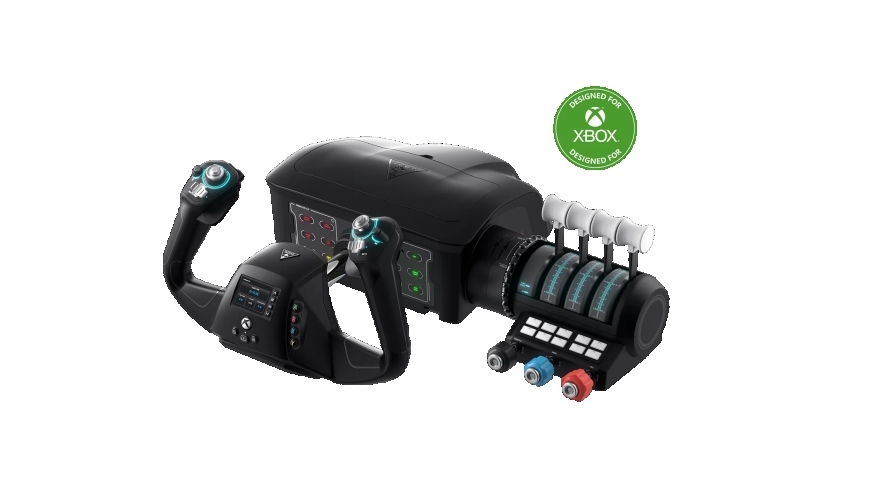
Turtle Beach, known for top-tier gaming accessories, has brought that same quality into the simulation space. Their VelocityOne Flight Universal Control System is one of the most versatile flight simulator controls available today.
With its hybrid design combining throttle quadrant, yoke, and trim wheel, it lets you experience the full realism of airliner flights while still offering joystick-like precision. Features include:
-
Two-handed yoke with smooth mechanical feel.
-
Realistic trim wheel for accurate pitch adjustments.
-
Modular throttle quadrant included.
-
Plug-and-play compatibility with Xbox Series X|S, Xbox One, and PC.
This makes Turtle Beach a strong contender for sim enthusiasts who want both immersive realism and high build quality without piecing together multiple separate accessories.
Which Should You Choose?
The best flight simulator control depends on your preferences, aircraft type, and gaming goals.
-
Choose a joystick if:
-
You enjoy flying combat sims or light aircraft.
-
You want something affordable and desk-friendly.
-
You need versatility for different types of games.
-
Choose a yoke if:
-
You’re focused on flying airliners or large GA planes.
-
You have space for a larger setup.
-
You want maximum realism and immersion.
For many, the ideal solution is eventually owning both. Start with a joystick if you’re on the fence—it’s easier to learn with. When you’re ready to specialize in airliner operations, upgrade to a Turtle Beach VelocityOne yoke system for the complete cockpit feel.
Conclusion
When it comes to flight sim joysticks vs. yokes, the decision really comes down to the type of flying you love most. Joysticks offer precision, affordability, and flexibility, making them great for new simmers and fighter jet enthusiasts. Yokes bring unmatched realism and immersion for commercial flights, especially in Microsoft Flight Simulator.
If you’re serious about flight sims, you might eventually want both. But if you want one device that can give you immersion and professional-level control right out of the box, the Turtle Beach VelocityOne Flight Universal Control System stands out as one of the best flight simulator controls today.
FAQs
Is a flight sim joystick or yoke better for beginners?
A flight sim joystick is often better for beginners because it’s more affordable, takes less space, and is easier to get comfortable with.
Can I use both a joystick and a yoke for flight simulator controls?
Yes. Many advanced sim fans keep both because joysticks are great for jets while yokes are perfect for airline flying.
Do yokes feel more realistic than joysticks?
For commercial flying, yes. A flight sim yoke provides a closer replica of real cockpits in planes like Boeing and Cessna, enhancing immersion.
Are flight simulator joysticks good for Microsoft Flight Simulator?
Absolutely. A joystick works well for GA planes, helicopters, and even some airliners. However, if you focus heavily on large jets, a yoke will feel more natural.
Are Turtle Beach controls good for flight simulation?
Yes. Turtle Beach is a highly recommended brand for flight simulator controls because of its innovative VelocityOne system, which provides professional-grade features for both beginners and enthusiasts.
Which is more durable, a joystick or a yoke?
Both can be durable depending on the brand, but premium flight simulator controls like the Turtle Beach VelocityOne often last longer due to higher-quality mechanics.