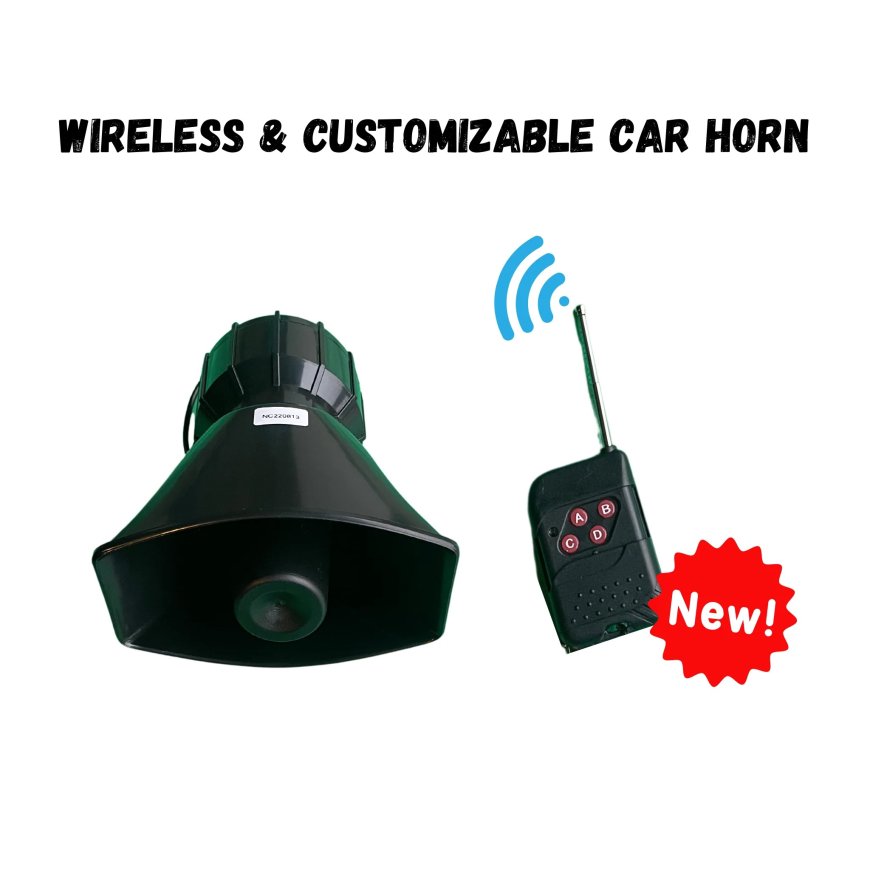
Customizing Your Wireless Car Horn Sounds
If you want a horn that reflects your style and stands out in any crowd, check out the Sonic Horn system and start personalizing your wireless car horn today.

If youre looking to add a personal touch to your vehicles horn, the Sonic Horn offers an exciting solution. This innovative wireless car horn system lets you customize your horns sound with ease, giving your car, truck, boat, or ATV a truly unique voice. With its user-friendly design and powerful 130 dB output, its more than just a hornits a way to express yourself on the road.
In this article, well walk you through how to customize your wireless car horn sounds, from uploading your own audio files to selecting the perfect sound for your ride.
Uploading MP3 or WAV Files to Your Wireless Car Horn
One of the standout features of the Sonic Horn wireless car horn system is its ability to accept custom sounds in MP3 or WAV format. This means youre not limited to standard honks or beeps; you can upload anything from your favorite song clip to a unique sound effect.
To get started, gather the audio clips you want to use. MP3 and WAV formats are supported, offering flexibility depending on your preference and file availability. Keep in mind the wireless car horn allows you to upload up to four distinct sounds, each triggered by one of the four buttons on the wireless remote.
This feature opens up endless creative possibilities. Want your wireless car horn to play a catchy tune, a fun sound effect, or even a personalized message? The Sonic Horn makes it easy and fun to transform your vehicles presence.
Using the USB Interface for Easy Transfers to Your Wireless Car Horn
Uploading your sounds is straightforward thanks to the Sonic Horns USB interface. Simply connect the wireless car horn control box to your computer using the USB cable provided. This direct connection allows for fast, hassle-free transfer of audio files without needing complicated software or setups.
Once connected, your device appears like a USB drive. Drag and drop your chosen MP3 or WAV files into the designated folder. The system automatically recognizes these files, making them ready for playback when you hit the corresponding remote button.
The USB interface also simplifies managing your sound library. You can easily replace or update your files whenever you want fresh sounds on your wireless car horn. This plug-and-play convenience ensures you can keep your horn sounding new and exciting.
Selecting the Perfect Sound for Your Wireless Car Horn
Choosing the right sound for your wireless car horn is a fun but important step. Since the horn is rated at an impressive 130 dB, it commands attention wherever you go. Its crucial to pick sounds that are both attention-grabbing and appropriate for the environment.
Consider your vehicle type and how you want to be perceived on the road. For a rugged truck or ATV, a powerful, commanding sound may suit your style. For boats or RVs, something playful or thematic could add a unique charm.
The Sonic Horn remote has four buttons, allowing you to switch between sounds depending on the situation. You might select a classic horn sound for everyday use and save your custom tunes or effects for special moments or events.
Whatever your choice, make sure the sounds are clear and distinct. The 20W amplifier ensures excellent sound quality, so your customized tones on your wireless car horn will always come through loud and clear.
Managing and Replacing Stored Sounds on Your Wireless Car Horn
One of the benefits of the Sonic Horn wireless car horn system is its flexibility in sound management. You can update or replace stored sounds at any time, adapting your horn to your mood, season, or event.
When you want to swap sounds, just reconnect the USB cable and access the stored files. Deleting old clips and uploading new ones is quick and intuitive. This flexibility means your wireless car horn never has to sound the same twice.
Additionally, the systems discreet design lets you mount it conveniently in the engine bay without affecting your vehicles appearance. This hidden installation keeps your custom sounds a surprise for anyone nearby.
Regularly updating your sound files also helps keep your wireless car horn fresh and exciting, making sure your vehicle stands out every time you hit the road.
Tips for Downloading Pre-Made Audio Clips for Your Wireless Car Horn
If you dont have custom sounds ready, the Sonic Horn website offers a selection of pre-made audio clips available for download. These clips cover a range of styles and themes, making it easy to find something that fits your personality and vehicle.
When choosing pre-made clips, consider the audio quality and format. The provided files are optimized for the system and guarantee excellent playback with the 20W amplifier on your wireless car horn.
Downloading clips from trusted sources, like the official Sonic Horn site, ensures compatibility and avoids issues with file corruption or poor sound.
You can even combine pre-made clips with your own uploaded files, creating a versatile sound library on your wireless car horn remote. This blend of convenience and customization is part of what makes the Sonic Horn so popular among vehicle enthusiasts.
Conclusion
Your vehicle deserves more than a generic horn sound. With the Sonic Horns wireless car horn system, you have the power to customize and control what your horn saysliterally. Whether uploading your own MP3 or WAV files, managing sounds via the USB interface, or choosing from pre-made audio clips, the process is designed to be easy, flexible, and fun.
The Sonic Horns impressive volume and clear sound quality ensure youll get noticed, while the remote control lets you switch between multiple sounds instantly. This system not only enhances your vehicles personality but also adds a layer of safety and awareness on the road.
Take control of your horns voice and make every beep count. Customizing your wireless car horn sounds has never been simpler or more enjoyable.